









::: warning 这个教程是Salesforce的Marketing Cloud :::
首先先下载一个SoapUI的工具,它是一个Soap测试工具,类似于PostMan,是专门测试Soap接口的工具。
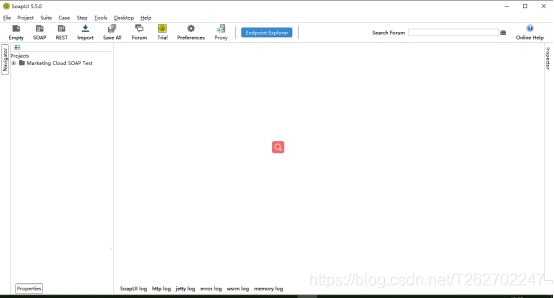
然后使用该工具,向Marketing Cloud发送Xml(Soap的报文都是xml格式的)
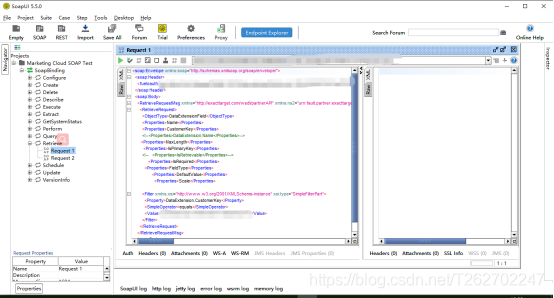
在SoapUI创建项目,点击File-New SOAP Project 即可创建一个SOAP项目。
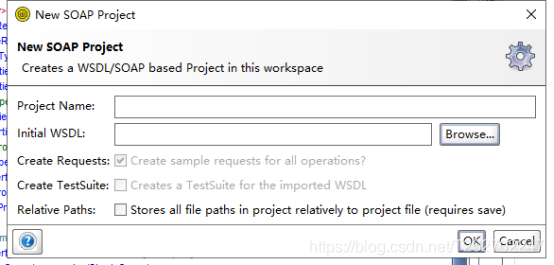
其中WSDL可以在下面链接的文章中找: 点这里点这里
等待一会儿,就可以看见树图了。
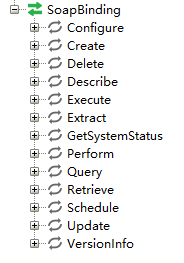
其中Retrieve用作查询,其他的是否有效有待验证。
然后就可以发送报文了,但报文中需要添加你的身份信息,即token。如何获得token呢?
下面是获取token的方法:
首先得在Marketing Cloud中配置读写权限,比如读取Automation,读取DE等,在 头像-setup-Apps-Installed Packages中就能创建一个Package,用来配置权限和调用API。
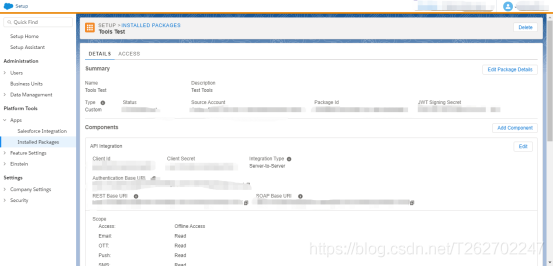
Client Id 和 Client Secret 就是调用API的用户名和密码,在package中提供了Authentication Base URI,REST Base URI和SOAP Base URI。
使用Authentication Base URI可以获取token信息,使用PostMan,向http://Authentication Base URI/v2/token 发送Post请求,就会获得供Soap API使用的token信息,要发送的要素有:
grant_type,client_id,client_secret,account_id,scope
其中参数说明:点这里点这里
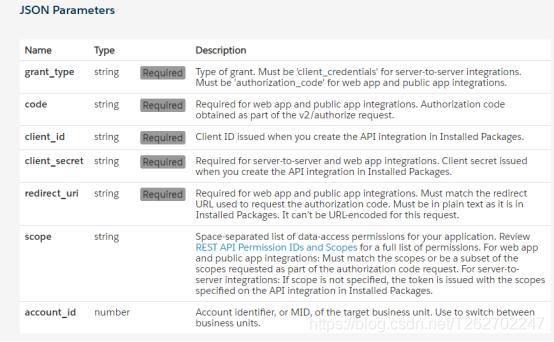
grant_type要素值设为client_credentials即可,client_id,client_secret就是package中的Client Id 和 Client Secret,account_id是环境号,即头像旁边选环境的MID,scope为权限信息,比如你想读automation,就设置成 automations_read,多权限用空格分隔。
获取的报文:
{ "access_token": "xxxxxxxxxxxxxxxxxxxxxxxxxxxxxxxxxxxxxx", "token_type": "Bearer", "expires_in": 1080, "scope": "data_extensions_read data_extensions_write automations_read", "soap_instance_url": "https://xxxxxxxxxxxxx.soap.marketingcloudapis.com/", "rest_instance_url": "https://xxxxxxxxxxxxx.rest.marketingcloudapis.com/" }
把accenss_token复制出来,粘贴到要发送的Soap报文中,就可以通过身份验证。
下面是Soap API要发送的查询报文示例
查询时要发送的XML:
<soapenv:envelope xmlns:soapenv=""http://schemas.xmlsoap.org/soap/envelope/"" xmlns:xsd=""http://www.w3.org/2001/XMLSchema"" xmlns:xsi=""http://www.w3.org/2001/XMLSchema-instance""> <soapenv:header> <fueloauth>xxxxxxxxxxxxxxxxxxxxxxxxxxxxxxxxxxxxxxxxx这里放刚才获得的token</fueloauth> </soapenv:header> <soapenv:body> <retrieverequestmsg xmlns=""http://exacttarget.com/wsdl/partnerAPI""> <retrieverequest> <objecttype>SubscriberList</objecttype> <properties>ID</properties> <properties>PartnerKey</properties> <properties>CreatedDate</properties> <properties>Client.ID</properties> <properties>Status</properties> <properties>List.ID</properties> <properties>List.ListName</properties> <properties>Subscriber.Status</properties> <properties>Subscriber.CreatedDate</properties> <properties>Subscriber.ID</properties> <properties>Subscriber.EmailAddress</properties> <properties>Subscriber.SubscriberKey</properties> <filter xsi:type=""par:ComplexFilterPart"" xmlns:par=""http://exacttarget.com/wsdl/partnerAPI""> <leftoperand xsi:type=""par:SimpleFilterPart""> <property>List.ID</property> <simpleoperator>equals</simpleoperator> <value>xxxxxx</value> </leftoperand> <logicaloperator>AND</logicaloperator> <rightoperand xsi:type=""par:SimpleFilterPart""> <property>CreatedDate</property> <simpleoperator>between</simpleoperator> <datevalue>2013-03-01T08:42:00</datevalue> <datevalue>2013-03-18T08:42:00</datevalue> </rightoperand> </filter> <queryallaccounts>false</queryallaccounts> </retrieverequest> </retrieverequestmsg> </soapenv:body> </soapenv:envelope>
这是subscriberList对象所包含的元素: 点这里点这里
可以看到,Subscriber 是一个Subscriber对象,如何查出该对象中的元素呢?那就需要这么写:Subscriber.ID 代表Subscriber对象的ID值。
有时候可以看到对象中含有数组元素,那么这种得怎么写properties呢?没法写。。。但这种包含数组的,基本都是一个对象数组,可以通过该种对象进行查询,比如:
查询DataExtension时,Fields就是一个DataExtensionField[]对象数组,这时,就可以通过DataExtensionField对象,查询该DE的所有DataExtensionField信息。即修改报文为
如果想开发一些方便的工具,Marketing Cloud还提供了SDK,并且是开源的。 这是SDK 的地址:点这里点这里
有C# SDK、Java SDK、Node SDK、PHP SDK、Ruby SDK、Python SDK
有趣的是,Java的SDK里有的方法还是带有中文备注的。
这个SDK还是不完善的,有的对象查询需要自己创建。
