系统运维
494
今天在Linux下源码安装好MySQL后,将mysql添加到系统的服务的过程引起了我的兴趣,我能不能自己写一个简单的脚本,也添加为系统的服务呢?
于是开干:
su vi myservice
然后模仿着mysql在里面开写:
#!/bin/bash start() { echo 'This is my service, start command' echo '' } stop() { echo 'This is my service, stop command' echo '' } restart() { echo 'This is my service, restart command' echo '' } status() { echo 'This is my service, status command' echo '' } case "$1" in start) start ;; stop) stop ;; restart) restart ;; status) status ;; *) echo 'Usage: service myservice {start|status|stop|restart}' echo '' exit 1 esac exit 0
很简单,myservice脚本执行时需要接受一个参数,这个参数可以是start, status, stop, restart中间的一个,收到参数后,仅仅做回显使用。写好之后,在拷贝到/etc/init.d/下面去,增加可执行权限,并添加到系统服务:
cp myservice /etc/init.d/myservice chmod +x /etc/init.d/myservice chkconfig --add myservice
然后就报错了:

google之,发现是chkconfig的注释不能少:
The script must have 2 lines:
# chkconfig: <levels> <start> <stop> # description: <some description>
之后再打开/etc/init.d/mysql,看看哪里不对,结果发现里面真有这个注释:
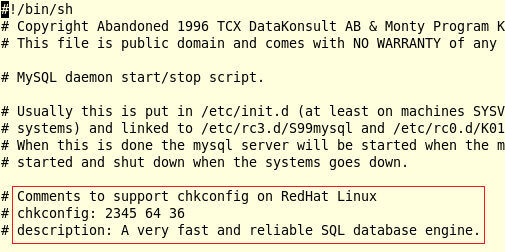
然后自己也跟着写了个这样的注释,于是脚本就变成了:
#!/bin/bash # For example: following config would generate link # S51myservice in rc2.d, rc3.d, rc4.d, rc5.d and # K49myservice in rc0.d, rc1.d, rc6.d # Comments to support chkconfig on RedHat Linux # run level, start order, stop order # chkconfig: 2345 51 49 # description: Customized service written by Alvis. start() { echo 'This is my service, start command' echo '' } stop() { echo 'This is my service, stop command' echo '' } restart() { echo 'This is my service, restart command' echo '' } status() { echo 'This is my service, status command' echo '' } case "$1" in start) start ;; stop) stop ;; restart) restart ;; status) status ;; *) echo 'Usage: service myservice {start|status|stop|restart}' echo '' exit 1 esac exit 0
这下好了,再次执行chkconfig:

去看看/etc/rc.d/rc2.d,/etc/rc.d/rc3.d,/etc/rc.d/rc4.d,/etc/rc.d/rc5.d下面都生成了什么:

可以看到,在rc2.d和rc3.d目录下都生成了一个链接S51myservice,S代表在该运行级别启动,51代表该服务的启动优先级。同理可推,在rc0.d、rc1.d和rc6.d这三个文件夹下会生成K49myservice链接:

接下来,可以测试刚刚编写的service 了:
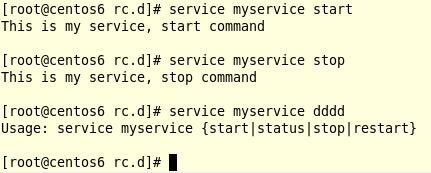
到这里,简单的service就算是编写完成了。真正的service只是包含了更多的逻辑而已,本质上和这个例子没什么区别。
参考: